Flash promo: Only $69.99 for 1Gig Internet

1Gig Internet at a price that moves you

Get UltraFibre 1Gig Unlimited for only $69,99/mo.* Plus, be up and running before the movers leave. Hurry, this offer won't last.

Home/Internet/Internet packages

Home Internet plans built for modern life

Discover home Internet plans that fit your lifestyle. Whether for work or play, stay connected with Cogeco’s fibre-powered Internet and unlimited data.

Our unlimited Internet packages

Order online for free activation and installation.
Flash promo
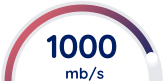
UltraFibre 1Gig Unlimited
Do everything. All at once.

Up to 1 Gig download speed

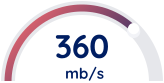
UltraFibre 360 Unlimited
Work, stream and game

Up to 360 Mbps download speed

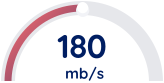
UltraFibre 180 Unlimited
Work from home and stream

Up to 180 Mbps download speed

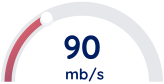
UltraFibre 90 Unlimited
Browse, check email and social media

Up to 90 Mbps download speed

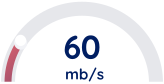
UltraFibre 60 Unlimited
Check email and social media

Up to 60 Mbps download speed

Move with peace of mind

Avoid the last-minute rush. Sign up for exclusive offers and get connected before your furniture is even set up.

Why shop online?

Unbox. Install. Connect. It's that simple!

Free activation—online only. Limited-time offer.

Save time - shop here for instant top deals.

Easy-peasy sign up, let's go.

Our packages include:

Advanced Wi-Fi technology

Get a strong connection in every corner of your home on every device, including Wi-Fi 6 for speeds 1 Gbps or higher.

Discover our Wi-Fi

An intuitive Wi-Fi app

Make it simple to control and manage your network with the Cogeco Wi-Fi app.

See our app

Enhanced security

Take your online security to the next level with Cogeco Security, powered by F-Secure.

Upgrade your security

Reliable Internet. You can count on it.

When you need to be online, you need a dependable connection. And that’s exactly what you get with Cogeco.

Dependable connection

Get a reliable connection powered by our fibre-optic network to give you the speed you need. Our network combines optical fibre and coaxial cable. Available where technology permits.

Unlimited plans

Choose from unlimited plans with fast speeds of up to 1 Gbps to connect everyone and multi devices at the same time.

Support from 100% local reps

We live and work in your community, and we’re here to support you, the way you want it—on the phone, over chat or in person at our stores.

Shop online and save

Find your perfect plan right here on cogeco.ca and subscribe online for the best price.

Your questions about Internet, answered

The Cogeco Wi-Fi app is an easy-to-use app that lets you set up and monitor your Cogeco Wi-Fi network from your mobile device. You can check your network health at a glance, see who’s logged in throughout your home, manage your network name (SSID) and passwords, and even improve your online experience with features such as threat protection and ad blocking.

Note: The app is only compatible with Cogeco Wi-Fi Pods, extenders and certain modem models. If you need to use the app to set up your modem, this will be covered in your modem’s setup instructions. If you want to order Cogeco Wi-Fi Pods or extenders, please contact customer service.

Where can I get the Cogeco Wi-Fi app?

The Cogeco Wi-Fi app is available for free on the iOS App Store and Google Play Store.

Note: The Cogeco Wi-Fi app is made by Plume, which has a similar app called HomePass, but you must be using the Cogeco Wi-Fi app for it to work with your Cogeco service.

How do I sign in?

When prompted to sign in, enter your Cogeco My Account username and password.

Don’t have a My Account profile yet? Register here.

What can I do with the app?

The app is separated into a few main sections that you can select from the bottom of the screen: Home, People & Devices and Menu & Settings.

Home

The home screen is a one-stop shop to monitor your network. It’s separated into sections, and you can change the order of those sections by selecting Personalize layout at the bottom of the screen.

People & Devices

People & Devices is where you set up profiles for the people in your home and manage connected devices.

Menu & Settings

Menu & Settings is a central place to view all of the settings for different features. Most of these settings can also be found where you manage your features on the Home or People & Devices screens.

You can also select FAQs to view our support articles on Wi-Fi and the app, or select Call us to speak with a local rep.

Webmail is offered free of charge to all Cogeco Internet customers. It's easy to set up, use, and it lets you:

  • Access your emails securely whenever you want, with any device that's connected to the Internet.
  • Store up to 1 GB of data if you're a residential customer, or up to 2 GB if you're a business customer.
  • Create folders to organize your emails.
  • Save your contacts in an address book with all the features you need (e.g. creating customized distribution lists, importing or exporting contacts, finding all the info about a specific contact quickly and easily, and saving the history of email exchanges).
  • Transfer your emails to the address of your choice, automatically.

How do I access Cogeco Webmail?

You can access Webmail by clicking the envelope icon located on almost every cogeco.ca page in the top-right corner.

If you’re subscribed to Cogeco Internet, you can install Cogeco Security on 2 devices for free. See below for details.

Installing Cogeco Security on a computer

  1. Log in to My Account in a browser.
  2. Select Cogeco Security from the side menu.
  3. Select Manage my licences.
  4. Select Add device.

    • If you’ve already used your 2 free licences, you can select a device to release its licence so that you can apply it to this one, or return to the Cogeco Security page on My Account and select Subscribe for unlimited licences. Learn more about upgrading to Cogeco Security+.
  5. Select My Device and Continue.


  6. Select Download for Mac or Download for PC to download the installer file.
  7. Open the installer and follow the prompts.
  8. When the installation is complete, Cogeco Security will open. Log in with your My Account username and password.
  9. Select Continue if you’re setting up protection for your own device, or select Installing for a child.

Installing Cogeco Security on a mobile device

  1. Open the App Store or Google Play, search for “Cogeco Security”, and proceed with the installation (see Cogeco Security on the App Store or Cogeco Security on Google Play).
  2. Read and confirm the terms and policies and select Continue (iOS) or ACCEPT AND CONTINUE (Android).
    CS User Agreements EN.png

  3. Enter your My Account username and password and select Sign in.
  4. If you’ve already used your 2 free licences, you’ll be given the option to release one so that you can apply it to another device. Select Release license, choose a device and select Release. You can also upgrade to Cogeco Security+ for unlimited licences. Learn more about upgrading to Cogeco Security+.
    CS Release Licences EN.png

  5. Select Continue if you’re setting up protection for your own device, or select Installing for a child.
    CS Setup EN.png
  6. Select Allow to receive push notifications on your device.

Your device is now protected. For the best protection, we also recommend setting up Safe Browsing. Learn more about setting up Safe Browsing on your device.

You can view your Internet usage from the last 3 months in My Account on the app or in a browser. Here’s how:

Viewing your usage on the app

  1. Open the My Account app and log in (download the app from Google Play or the App Store, or scan the QR code below).
    My_Account_QR_2_-_EN.png
  2. Select the Services tab.
  3. Select your Internet package.
  4. Select a billing period to view under Data usage history.

Viewing your usage in a browser

  1. Log in to My Account.
  2. Select Services from the side menu.
  3. Select Internet from the top menu.

If you don’t have a My Account profile yet, register here.

About monthly Internet usage caps and additional costs for going over

Some of our Internet packages have a monthly data limit. If this applies to your package, an additional fee will be applied for each gigabyte (GB) you use over the limit.

Learn about ways to reduce your usage.

Usage notifications

To help you manage your Internet usage, Cogeco sends automatic emails when you reach 75%, 90% and 100% of your monthly bandwidth limit. By default these notifications will be sent to your primary Cogeco email address, but you can select a different address by contacting customer service.

Good to know: The term “Internet usage” refers to the amount of data your computer sends and receives over the Internet. Data is measured in megabytes (MB) or gigabytes (GB).

To manage your Wi-Fi network name and password, please select your model below. These helpful articles will cover how to find your modem’s default network name and password, how to customize or update them, and how to reset the password if you’ve forgotten it.

Note: If you're using Cogeco Wi-Fi Pods or extenders, the network name and password will be managed through the Cogeco Wi-Fi app (residential) or the Cogeco Business Wi-Fi app (business) instead.

WiFiPod.pngAdtran-Extender.png

mceclip0.png

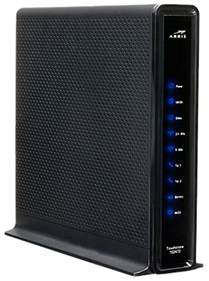
ARRIS TG2472

mceclip1.png

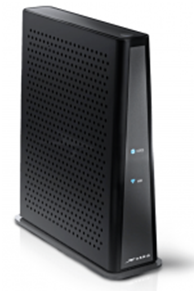
ARRIS TG3452

mceclip2.png

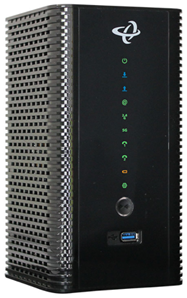
Hitron CODA-4589

mceclip4.png

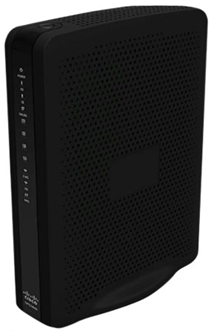
Cisco DPC3848 or other model

mceclip0.png Adtran-Extender.png

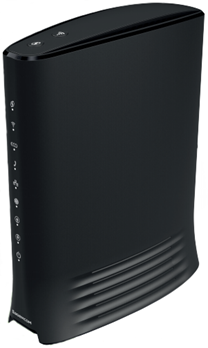
Sagemcom F@st 3896 or Adran 854

With the F@st 3896 modem or Adtran 854 router, your network will be managed through the Cogeco Wi-Fi app (residential) or the Cogeco Business Wi-Fi app (business).

Note: If your modem model is not listed, please follow the steps in the Cisco DPC3848 article to find your default network name and password, or to reset them to defaults if you've forgotten them.

Want to shop with a local agent or find a store in your area?

Chat with an agent

We’re here to help you and suggest products and services, promotions and answer questions.

Find a Cogeco store

Do you prefer shopping in person? We’re happy to serve you at your local Cogeco store.

Locate your nearest store

Speak with a sales agent

We're here to help you place an order or add services.

1-866-261-4447
GENERAL RESTRICTIONS AND LEGAL INFORMATION FOR MOBILE SERVICES ONLY (Residential services legal information available below)


Mobile

¹Network: Where mobile services are available. Check our Service Availability tool to see if your address is eligible for service. Once subscribed, mobile services are accessible in Cogeco’s and its third party network partners’ coverage areas. 5G available where technology permits, on compatible devices. BYOP refers to 'Bring your own phone'. Customer devices will be subject to a device compatibility test to ensure our service will work.

²Limited-time offers: First-line discount with application of bundle ($10/month) and pre-authorized debit (PAD) ($10/month) discounts for eligible customers. If the Internet service or PAD conditions are no longer met during the promotional period, the respective discounts will be removed from the account.

The first-line discount applies only to monthly rate plan charges, for up to 12 consecutive months, on select mobile plans. Following the promotional period, standard rate plan monthly charges will apply. This discount is only applicable to the first line.

Additional services, features and add-ons are not included and regular charges will apply, including applicable taxes.

This limited-time offer is only for active Cogeco Internet customers, where Cogeco Mobile is available. Cogeco reserves the right to modify or withdraw this offer at any time, without prior notice.

Plans: ³Rollover data plans include unlimited nationwide calling and texting to numbers within Canada (calls and texts to premium numbers will be blocked), along with a specified data allowance that can be rolled over to the next month, as follows: A - Starting on your second month of receiving Service, any data you have not used by the end of the month will be rolled over to the next month. B - The maximum rollover data you can have at any given time is equal to the monthly data included in your plan. C - Rollover data will expire if you change plans. If you change to another data plan, you will start to accumulate rollover data in your second month after your plan change. D - Unused data included in Cogeco Roam Packs, Data Top-Up, and Bonus Data Top-Up cannot be rolled over.

⁴Talk and text plans provide unlimited nationwide calling and texting to numbers within Canada (calls and texts to premium numbers will be blocked). These plans also allow you to use 10 MB of "accidental" data before a data protection cap is applied. You have the option of removing the data protection cap and using pay-per-use data.

Add-ons:

⁵Additional data valid for current billing cycle only; does not rollover.

⁶Valid for international calls from Canada to selected destination(s). All calls are rounded up to the next full minute.

⁷The International Long Distance Saver reduces the cost of making international calls from Canada. The list of countries included in the International Long Distance Saver and the applicable rates and savings can be found here: https://www.cogeco.ca/en/support/mobile/long-distance-rates. All calls are rounded up to the next full minute.

⁸Connection fee: One-time charge for administrative costs associated with account or line set up. Applied each time a new line is added to an account, unless specified in the offer as waived.

International roaming:

⁹Cogeco Daily Roam: Cogeco Daily Roam lets you use your monthly plan's text, voice, and data allotment while travelling in the United States for an additional $7/day or in over 60 other countries for an additional $15/day. Visit the Cogeco Daily Roam page at https://www.cogeco.ca/en/mobile/travel for a complete list of countries. You will only be charged the daily rate on the days you place or answer a call, send or receive a message, or use data, while roaming. Each 'day' of Cogeco Daily Roam is 24 hours from when you first place/answer a call, send/receive a message, retrieve voicemail, use data, or activate call forwarding. You can be charged for Cogeco Daily Roam at the applicable rate up to 20 times per billing cycle, after which you may continue using your monthly plan for the remaining days in your billing cycle with no additional Cogeco Daily Roam charges, until your billing cycle renews. Cogeco Daily Roam is active on your account unless you remove it.

¹⁰Pay-per-use (PPU): Roaming pay-per-use rates may vary by destination, as may rounding practices.

Discounts:

¹¹Bundle discount: Flat discount to monthly rate plan charges, applicable to each line in the account. To be eligible for the Internet Bundle Discount you must have an active Cogeco Internet subscription under the same account name, in good standing. If your Cogeco Internet subscription is cancelled, the discount(s) will be removed. Discount(s) will be prorated if added in the middle of a billing cycle.

¹²Pre-authorized debit discount: The pre-authorized debit ("PAD") discount is available to mobile customers who subscribe to an eligible in-market mobile plan and set up monthly PADs. Discount will be applied to your monthly rate plan fee for as long as PAD is active on the account. The PAD discount will apply immediately upon activation of your mobile service but will be removed if you do not set up PAD as a payment method within 30 days. This discount may also be removed if your mobile service is terminated, you change to an ineligible plan, your payment method is expired, or if payment fails. Discount will be prorated if added in the middle of a billing cycle.

¹³Worry-free data:

Worry-free data is applied to your account at the time of activation and prevents you from incurring pay-per-use data charges at home or while roaming outside of Canada. Cogeco will notify you by text when you reach 75% and 100% of your data limit and data will be paused when you reach 100% of your data limit. . For personal and residential purposes only. Photos are for illustrative purposes only.

¹⁴Mobile Device Protection:

Mobile Device Protection is available exclusively to active Cogeco customers in Ontario who are subscribed to an eligible plan with Mobile Device Protection. Phones must have been successfully registered to the Cogeco network, and coverage will become active 30 days after being subscribed to the eligible mobile plan. Repairs for screen damage and malfunctions, and eligible battery issues are covered. Service fees (plus applicable taxes) apply to all approved repairs and replacements. Cogeco reserves the right to modify or withdraw the Mobile Device Protection feature at any time without prior notice.

¹⁵30-day money-back guarantee:

If you are new to Cogeco Mobile and are not satisfied with the service, you have 30 days from the service start date to cancel your service and, so long as you have used no more than 50% of your monthly usage allotment, your monthly fee (or portion thereof) will be waived. If you are a person with a disability, you may use up to 100% of your voice minutes and data included in your plan.

GENERAL RESTRICTIONS AND LEGAL INFORMATION FOR RESIDENTIAL SERVICES ONLY

Limited time offer. Restricted to new customers and former customers who cancelled all of their services more than 6 months ago.

Our network combines optical fibre and coaxial cable. Available where technology permits. For personal and residential purposes only. Visit cogeco.ca for details. Photos are for illustrative purposes only.

Installation and Activation

An activation fee of $30 will be charged for activation of service.

A fee of $130 per technician visit for a standard professional installation will apply. Supplementary installation fees may apply for additional work requested. Pre-authorized debit or credit card payment and service bundling on a single invoice may be required.

A termination fee of up to $75 per service will be charged to customers who cancel their services before the end of the offer period. Termination fees not applicable in Quebec.

With self-install, a fee of up to $80 applies for a technician visit where installation services are required and/or where the issue is not caused by Cogeco (services or equipment).

Internet

Additional charges will apply for exceeding the monthly data transfer capacity (GB) allowed for each specific Cogeco Internet package. See details. Download and upload speeds can vary with Internet traffic, remote peers, the customer’s network configuration, the use of wireless equipment and other factors. See details. All Internet packages include 2 free installations of Cogeco Security services for desktop and/or laptop computers. Cogeco Security GO with unlimited installations for computers, tablets and wireless devices is available at a regular price of $5.99/month. See details. Wi-Fi hotspots provide free and unlimited Internet access to Cogeco subscribers and limited access to non-Cogeco subscribers. See details. ULTRAFIBRE®

Wi-Fi Pods and Wi-Fi extenders require a subscription to an UltraFibre 40 Internet package or higher.

UltraFibre 1 Gig Unlimited : Up to 1 Gbps of total download speed through the combination of multiple devices including at least one wired connection (Ethernet) combined with one or multiple wireless connections to Cogeco’s 1 Gig modem. Up to 940 Mbps download speed can be achieved when connecting to one personal Internet device with one wired connection (Ethernet).

EPICO

Cogeco EPICO service provides combined access to Cogeco TV and Internet services with a subscription to Cogeco TV, an EPICO 4K Box and a minimum subscription to the UltraFibre 60 Unlimited Internet package with a Wi-Fi modem.

Download speed, upload speed, signal and picture quality can vary depending on various factors.

Channel availability may vary by region. Selected TV channels can only be modified once every 30 days. The channel lists for the pre-selected packages cannot be modified. Additional fees may apply for some channels and some channels may count for several choices. Viewing content (live or recorded) is restricted to Canada.

Channel availability for the Restart and Just Missed features may vary according to the content rights and viewing restrictions.

A separate subscription to Netflix® is required.

The EPICO app provides access to the TV channels included in the EPICO package to which the customer is subscribed. Some channels included in the EPICO package may not be available to watch out-of-home due to content rights restrictions. Viewing content is restricted to Canada.

On Demand requires a subscription to the TV package containing the associated digital channel. Purchased movies remain available as long as the customer is subscribed to the Cogeco EPICO service and as long as the title remains available in the On Demand library. Rented movies are available for the duration indicated on the screen.

Beginning November 27th, 2024, all recordings are available for a maximum of 90 days or until the termination of your EPICO service, whichever comes first. By default, older recordings will be automatically removed to match the number of hours in your block. Additional blocks of recording hours may be available to add with certain EPICO packages (up to unlimited recording capacity).

An EPICO package including an EPICO 4K Cloud PVR is required to download and view TV recordings in and out-of-home.

One EPICO 4K Cloud PVR per TV set. Each additional EPICO 4K Box or EPICO 4K Cloud PVR is available at $7 per month.

Television

Cogeco TV service requires the rental of an HD digital receiver with a minimum subscription to the Basic Channels package. Channel availability may vary by region. TV packages and selected channels can only be modified once every 30 days. Additional fees may apply for some channels and some channels may count for many choices. The channel lists of the pre-selected packages cannot be modified. Cogeco On Demand requires a subscription to the TV package containing the associated digital channels. Requirements to watch 4K: (i) a 4K TV and 4K receiver, (ii) a subscription to the SD/HD channels corresponding to the 4K channels. 4K not available with all channels.

Access to the mobile apps requires a subscription to the TV package containing the associated digital channel. The content viewed on mobile apps requires bandwidth, which is included in the customer's Internet or cellular data package. Additional usage fees may apply if the customer exceeds the monthly data transfer capacity (GB) included in his package. Viewing content is restricted to Canada.

TiVo service from Cogeco requires: (i) the rental of a TiVo receiver, (ii) a Wi-Fi modem, and (iii) a subscription to Cogeco Internet and (iv) a TV package. Each additional TV set combined with a TiVo PVR requires the rental of a TiVo HD receiver. Installation charges may apply for additional outlets. Data traffic consumed between the TiVo boxes and the Internet to supply programming information counts towards customer’s Internet usage. Additional usage fees may apply if the customer exceeds the monthly data transfer capacity (GB) included in the package. Viewing content is restricted to Canada. TiVo®. Apple®. YouTube®.

*Premium releases are $24.99

Home Phone

Phone equipment must stay at the same address where it was initially installed in order to allow 911 to associate the call with the correct address in the event of an emergency.

Home Phone equipment

New generation Phone Equipment does not include an external backup battery. Batteries can be purchased separately for certain models (Hitron CODA-4589 and Arris TG3452G) while supplies last. Sagemcom (F@ST3896) equipment does not include a backup battery. See details

Subscription to a Cogeco Home Phone package is required for all long distance plans. Limited to a list of countries predetermined by Cogeco. Additional minutes will be charged at the then current rate, per minute per country, applicable for the remainder of the month.See details. A fee of $0.95 per call for the use of the directory assistance (411) may apply, depending on the phone package.

Since November 30, 2023, people across Canada can call and text 9-8-8, a new three-digit service, for help with mental health and suicide prevention. 9-8-8 is free for anyone in Canada who is thinking about suicide, in emotional distress, or who is worried about someone they know.

New Residential Home
  • Limited-time offer. Some additional fees and conditions apply. Available only to residential Cogeco customers at their newly built residence in specific new construction areas. This offer is limited to new customers. At the end of the offer period, the advertised savings will no longer apply and the then current regular prices will apply. Prices may vary based on the packages available during the offer period. Regular prices may change at any time, but the amount of the savings per month will remain for the duration of the offer period.

  • Available where technology permits. For personal and residential use only. Visit cogeco.ca for details.

5$ discount

*Prices and packages may vary by region. Prices are subject to change at any time. Taxes not included. Available where technology permits. For personal and residential purposes only. A fee of $130 per technician visit for a standard installation will apply. Supplementary installation fees may apply for additional work requested. Pre-authorized debit or credit card payment may be required. **This rebate offer may be combined only with selected Cogeco offers. Offers and permitted combinations are subject to change at any time.